 I’ve never been happier to read an article by TechCrunch…
Killing Rumors With Facts: No, Facebook Didn’t Decrease Page Feed Reach To Sell More Promoted Posts
Josh Constine, you’re my hero.
If you’ve been reading my blog (and of course you have been!), you know that I’ve become increasingly grumpy about this subject. I’ve felt like the old man screaming in an empty room.
It seems that everyone has made up their minds that 1) Reach is down, and 2) Facebook is forcing us to pay for ads.
My data doesn’t support it (read this or this). In fact, I’m entirely convinced that Reach means very little right now. Everyone is fixated on this number while very few people talk about metrics that matter.
Anyway, this blog post isn’t about that. It’s about two things. First, Josh Constine’s awesome mic drop article. Second, some instructions on another “silent killer of Facebook Page Reach” that you need to research.
Cause of Reach Issues: Spam Filters
I’ll just let Josh explain this…
Each news feed post has a drop-down arrow next to it that lets users hide it from their news feed or mark it as spam. Facebook made these controls more visible and easy to use in September. That let people who thought a Page was spammy report it to Facebook or remove it from their feed.
At the same time, Facebook updated EdgeRank to more aggressively punish spammy Pages, the way Google updates PageRank occasionally to push down the search result rank of spammy sites.
When the change was made, these spam reports went way up. But as Facebook collected this data along with information about Pages you engage with, users began seeing fewer and fewer of this spammy content. As a result, fewer spam reports were made.
Here is an image from PageLever (also from the TechCrunch article) that visualizes this initial spike and then slowdown of spam reports:
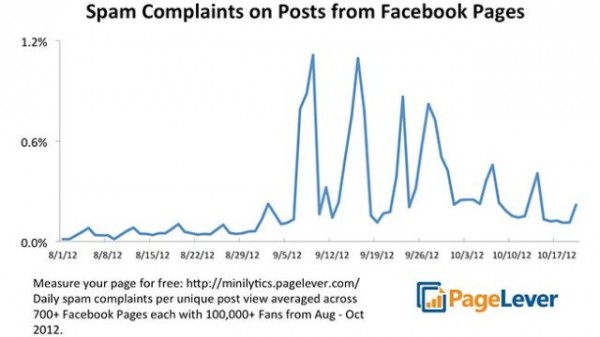
Image courtesy of PageLever and TechCrunch
So what about the non-spammy Pages, right? They benefitted. Page Reach has remained relatively constant dating back to the beginning of July. Here is another chart from PageLever and TechCrunch:
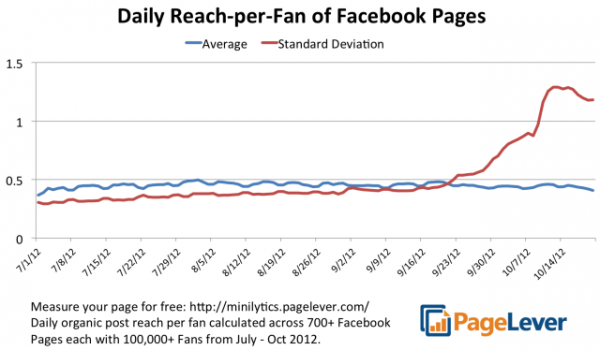
Graph courtesy of PageLever and TechCrunch
What does this mean? Once again, I’ll let Josh explain…
The amount of fans Pages were reaching has stayed relatively stable since July. However, the standard deviation of reach did shoot up. That’s because the few especially spammy Pages and those affected by an increase in news feed competition had their reach drop significantly, while the reach of Pages that almost never get spam reports got a boost. That’s the impact of Facebook’s changes to the spam reporting UI and the EdgeRank algorithm.
There’s more to Josh’s article, and I beg you to read it. Very well done.
Is Your Page Spammy?
I don’t know about you, but this was my first question. Whether or not you think your Page is spammy is irrelevant. Facebook users will tell you.
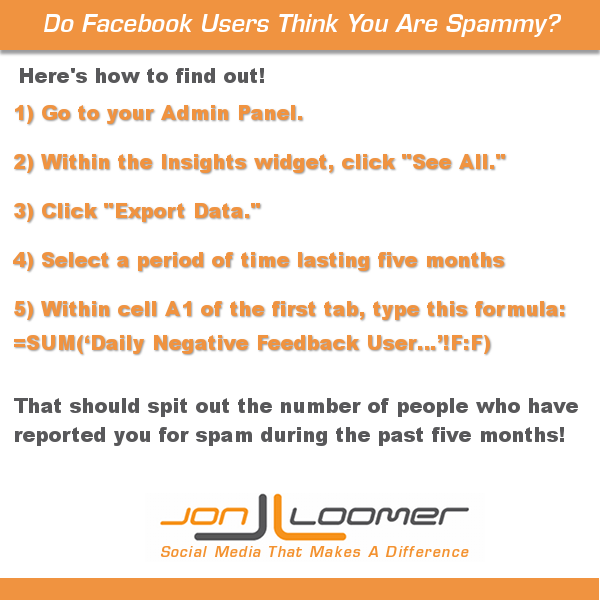
How do you figure this out? I’m glad you asked. There’s a video that walks you through this at the bottom. But here are the basic steps for finding out how many people have reported your Page for spam during the past five months…
1) Go to your Admin Panel.
2) Within the Insights widget, click See All.
3) Click Export Data.
4) Select a period of time lasting five months, leaving it on Page Level Data.
5a) Within cell A1 of the first tab (or really anywhere), type in this formula:
=SUM(‘Daily Negative Feedback User…’!F:F)
That should spit out the number of people who have reported you for spam during the past five months.
5b) Or you can run a search of the workbook for “spam_” and the first result should take you to the correct tab. You’ll know you’re on the right tab if the A2 cell reads…
Daily The number of people who have given negative feedback to your Page, by type. (Unique Users)
Then simply type the following formula anywhere within that tab, other than in the F column…
=SUM(F:F)
The number I get is 34, which is about .5% (that’s a half of one percent) of my total Fans.
Is that bad? I don’t have a point of reference. But I do know that my numbers haven’t suffered, so I am going to assume it’s acceptable.
How many people have reported your Page for spam? Are you seeing a corresponding drop in Reach and Engagement? Let me know below!
6YNBDPZECMK9